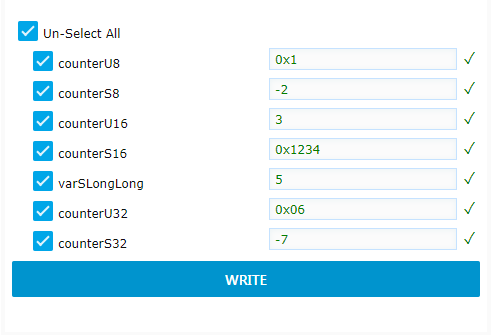
writevariables
<script type="text/x-red" data-help-name="ui_write">
Add a "write" widget to the dashboard
Properties
GroupDashboard group
Allows to define the dashboard group in which the Write widget will be rendered.
Size(width x height) or auto
Allows to specify the Write widget size in:
Fixed modeIn that case, you specify the width and height of the widget with fixed numbers of units (a unit is 48px wide by default with a 6px gap).Auto modeIn this case, the width will fill the width of the dashboard group.
Namestring
Name of the node in the flow.
Input
The input msg represents a group of variables to be displayed in the Write widget. It has to be received only once when the flow is deployed. The payload can be set manually using an inject node or set with the "variables" node. If set manually, the payload property must be formatted in the following way to be processed
payloadobject
The payload object holds several properties:
-
groupnamestring -
variablelistarray of variables each holding following properties: -
namevariable name -
addressvariable address -
typenumber from 1 to 10 representing the variable type (1: Unsigned 8-bit,2: Signed 8-bit,3: Unsigned 16-bit,4: Signed 16-bit,5: Unsigned 32-bit,6: Signed 32-bit,9: Float,10: Double). -
accesspointnumber (access port)
The following example shows an input msg payload for a write widget node :
          {
            "groupname": "nv\_group",
            "variablelist": \[
              {
                "name": "counterU8",
                "address": "0x20000090",
                "type": 1
              },
              {
                "name": "counterS8",
                "address": "0x20000091",
                "type": 2
              },
              {
                "name": "counterU16",
                "address": "0x20000128",
                "type": 3
              },
              {
                "name": "counterS16",
                "address": "0x2000012a",
                "type": 4
              },
              {
                "name": "counterU32",
                "address": "0x20000178",
                "type": 5
              },
              {
                "name": "counterS32",
                "address": "0x2000017c",
                "type": 6
              }
            \],
            "accesspoint": 0
          }
Output
The output msg object holds following properties:
topicstring
The topic is automatically set to "write" command. This "write" topic is processed by acqOut node to actually send the write command to the target.
payloadobject
The payload is an array representing the list of variables to display in the widget (in dashboard mode). Each variable holds several properties:
namestring representing the name of the variableaddressstring representing the start address of the variabletypenumber from 1 to 10 representing the variable type (one ofUnsigned 8-bit,Signed 8-bit,Unsigned 16-bit,Signed 16-bit,Unsigned 32-bit,Signed 32-bit,Float,Double).valuestring representing the value to write either in hexadecimal (starting by 0x or 0X) or in decimal
The following example shows an output msg for a write widget node:
        {
          "payload": \[
            {
              "name": "counterU8",
              "address": "0x20000090",
              "type": 1,
              "value": "0x1"
            },
            {
              "name": "counterS8",
              "address": "0x20000091",
              "type": 2,
              "value": "-2"
            },
            {
              "name": "counterU16",
              "address": "0x20000128",
              "type": 3,
              "value": "3"
            },
            {
              "name": "counterS16",
              "address": "0x2000012a",
              "type": 4,
              "value": "0x1234"
            },
            {
              "name": "counterU32",
              "address": "0x20000178",
              "type": 5,
              "value": "0x06"
            },
            {
              "name": "counterS32",
              "address": "0x2000017c",
              "type": 6,
              "value": "-7"
            }
          \],
          "topic": "write",
        }
Details
The write widget node is designed to be linked with a "variables" node on its "in" port, and with "acq out" node its "out" port

Once deployed, a write widget is displayed in the dashboard presenting a list of variables (name, address, type) coming from the input msg. The end user can then fill some values for each variables and click on WRITE button to actually write the values in the memory target.